Calculator
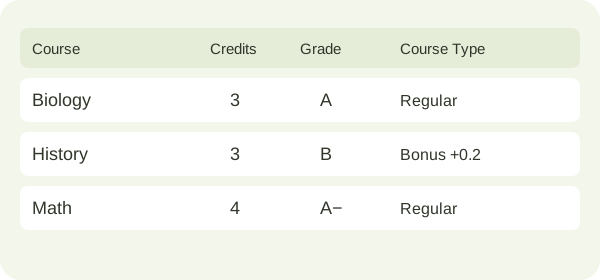
Choose your GPA scale and enter course credits and letter grades. Keep Course Type as Regular, or use Custom Bonus to add extra GPA points to a course.
Free GPA calculators for every scale. Use the Simulator to preview GPA changes from individual courses, and use the Planner to calculate the grades you need to reach your target.
This selection applies to Calculator, Simulator and Planner. The mapping can be found at Letter Grade and GPA Scale Reference ↓
| Course | Credits | Grade | Course Type | Actions |
|---|---|---|---|---|
Custom bonuses are personal scenarios. Use Regular unless your calculation explicitly includes extra course points.
Your GPA is a credit-weighted average of the courses you enter. Add one term’s courses for a semester GPA, or include courses from multiple terms for a cumulative GPA. The result reflects the selected grading scale and the courses included.
Shows your total quality points divided by your total credits. It is displayed to two decimal places.
The sum of the credit values you entered. Courses with more credits contribute more to the result.
Each course’s credits multiplied by its grade points, then added together. These points are the basis of your GPA.
If you already know your historical GPA and completed credits, use GPA Planner to project your final cumulative GPA with future courses. Keep the same grading basis throughout.
Calculate your starting GPA, explore grade changes, then plan the grades needed for your target.
Choose your GPA scale and enter course credits and letter grades. Keep Course Type as Regular, or use Custom Bonus to add extra GPA points to a course.
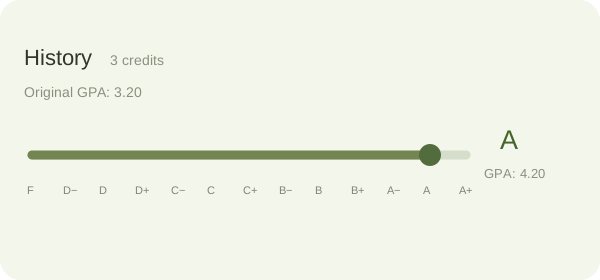
After calculating, open GPA Simulator and adjust each letter-grade slider. Compare original and simulated grades and GPA points. Credits and custom bonuses stay fixed
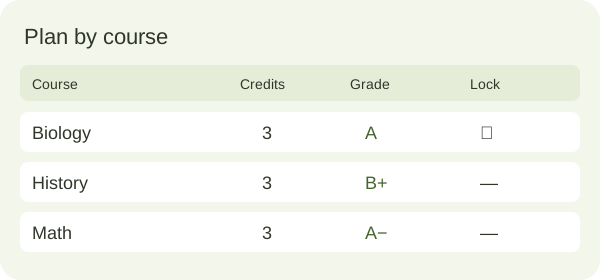
Enter your current GPA, completed credits and target in GPA Planner. Select Start Plan to generate a plan, and locked grades stay fixed.
Illustrations show example values on the 4.0 scale. Simulator and Planner unlock after Calculate GPA. The Planner defaults to your Calculator results and supports manual adjustments. Plan by remaining credits is also available for finding the required average.
Look up letter-grade points on your selected scale, then add any custom bonus before credit weighting. Regular courses have no bonus. GPA displays two decimals while calculations retain full precision.
Adjust letter grades to calculate a what-if GPA and compare it with your baseline. The selected scale, course credits and custom bonuses stay fixed, and your original calculated result remains unchanged.
Start with your Calculator GPA and credits, or adjust them manually. Use your target and remaining credits to find the required average, which is rounded up to two decimal places.
Locked courses keep their grades and bonuses; unlocked courses use generated grades without bonuses. Apply these points to the quality-point and final-GPA formulas above. Generated plans must meet or exceed your target.
Use the selected scale’s minimum and maximum points to find achievable limits. Locked courses retain their grades and bonuses. Targets outside this range receive an explanation; displayed results use two decimals.
These exact preset values are used throughout Calculator, Simulator and Planner. Custom edits affect your custom mapping only.
| Letter Grade | 4.0 Scale | 4.3 Scale | 5.0 Scale | 10.0 Scale |
|---|---|---|---|---|
| A+ | 4 | 4.3 | 5 | 10 |
| A | 4 | 4 | 5 | 10 |
| A− | 3.7 | 3.7 | 4.63 | 9.25 |
| B+ | 3.3 | 3.3 | 4.13 | 8.25 |
| B | 3 | 3 | 3.75 | 7.5 |
| B− | 2.7 | 2.7 | 3.38 | 6.75 |
| C+ | 2.3 | 2.3 | 2.88 | 5.75 |
| C | 2 | 2 | 2.5 | 5 |
| C− | 1.7 | 1.7 | 2.13 | 4.25 |
| D+ | 1.3 | 1.3 | 1.63 | 3.25 |
| D | 1 | 1 | 1.25 | 2.5 |
| D− | 0.7 | 0.7 | 0.88 | 1.75 |
| F | 0 | 0 | 0 | 0 |
Explore other calculators that fit your credit calculation needs.
Your GPA goals start with your next assignment
Upload your assignment requirements and references, and use Verla to build a draft aligned with your course criteria.
Start Your Assignment With Verla AIUse the draft as a starting point for your own work. Your final grades depend on the work you submit and your course’s assessment criteria.