Percentage Grades
A percentage expresses a course grade on a 0–100 scale. For example, 85% maps to a letter grade of B, which equals 3.00 on a 4.0 scale.
Convert your percentage grades(0-100 scale) to the 4.0/4.3/5.0/10.0 GPA scale
Select a target GPA scale. Percentage → letter band → exact table GPA; then weight course GPAs by credits.
| Course | Credits | Grade (%) | Actions |
|---|---|---|---|
This calculator converts your input percentage grades into letter grades, maps them to the final GPA, and weights the results by course credits.
A percentage expresses a course grade on a 0–100 scale. For example, 85% maps to a letter grade of B, which equals 3.00 on a 4.0 scale.
GPA credits are the credits attached to courses included in your calculation. A 4-credit course contributes twice as much as a 2-credit course.
Quality points are calculated as a course’s converted GPA multiplied by its credits. A 3-credit course with a 3.30 GPA contributes 9.90 quality points to the overall result.
This is a linear estimate, not an official school conversion. Letter-grade bands, weighted-course bonuses and institutional rules can produce different GPAs.
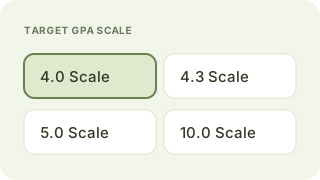
Choose 4.0, 4.3, 5.0 or 10.0 as your target GPA scale. Your selected scale applies to every course and stays the same when you open Simulator.
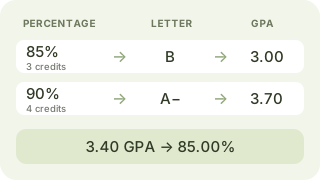
Enter each course’s percentage and credits. We map percentages to letters, then GPA, weight by credits, and derive your overall percentage from the weighted GPA.
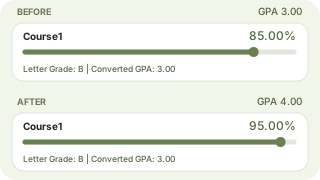
Open Simulator and drag a course’s percentage slider to compare results. Credits and baseline labels stay fixed, while your weighted GPA and GPA-derived percentage update.
Illustrations use sample values on the 4.0 scale. Simulator keeps your selected scale and your original calculated grades.
Apply the band’s lower threshold without rounding the percentage first. For example, 93.00% up to but not including 97.00% maps to A; 97.00% through 100% maps to A+. A score below 60% maps to F.
For 85%, the letter grade is B. B maps to 3.00 on 4.0 and 4.3, 3.75 on 5.0, and 7.50 on 10.0. Use the exact table values, including the listed two-decimal values on the 5.0 scale.
On the 4.0 scale, a 3-credit B contributes 3 × 3.00 = 9.00 quality points. A 4-credit A− contributes 4 × 3.70 = 14.80 quality points.
For the two example courses: (9.00 + 14.80) ÷ (3 + 4) = 3.40. The Total row and Your GPA use this same weighted result.
First find the percentage band and its letter grade, then read across to the selected GPA scale. Multiple percentages can map to the same letter and GPA.
| Percentage | Letter Grade | 4.0 scale | 4.3 scale | 5.0 scale | 10.0 scale |
|---|---|---|---|---|---|
| 97–100% | A+ | 4.00 | 4.30 | 5.00 | 10.00 |
| 93–96% | A | 4.00 | 4.00 | 5.00 | 10.00 |
| 90–92% | A− | 3.70 | 3.70 | 4.63 | 9.25 |
| 87–89% | B+ | 3.30 | 3.30 | 4.13 | 8.25 |
| 83–86% | B | 3.00 | 3.00 | 3.75 | 7.50 |
| 80–82% | B− | 2.70 | 2.70 | 3.38 | 6.75 |
| 77–79% | C+ | 2.30 | 2.30 | 2.88 | 5.75 |
| 73–76% | C | 2.00 | 2.00 | 2.50 | 5.00 |
| 70–72% | C− | 1.70 | 1.70 | 2.13 | 4.25 |
| 67–69% | D+ | 1.30 | 1.30 | 1.63 | 3.25 |
| 63–66% | D | 1.00 | 1.00 | 1.25 | 2.50 |
| 60–62% | D− | 0.70 | 0.70 | 0.88 | 1.75 |
| Below 60% | F | 0.00 | 0.00 | 0.00 | 0.00 |
Explore other calculators that fit your credit calculation needs.
Your GPA goals start with your next assignment
Upload your assignment requirements and references, and use Verla to build a draft aligned with your course criteria.
Start Your Assignment With Verla AIUse the draft as a starting point for your own work. Your final grades depend on the work you submit and your course’s assessment criteria.