Letter Grades and Calculation Percentages
Use each letter’s Calculation Percentage from the reference table. B uses 84.50%, A− uses 91.00%, and F uses 0.00% across all four GPA scales.
Convert your 4.3 GPA scale to the percentage grades(0-100 scale)
| Course | Credits | Grade | Actions |
|---|---|---|---|
This calculator assigns each course a Calculation Percentage based on its letter grade, then combines these percentages using course credits. The total percentage determines your overall letter grade and the corresponding GPA on your selected scale.
Use each letter’s Calculation Percentage from the reference table. B uses 84.50%, A− uses 91.00%, and F uses 0.00% across all four GPA scales.
GPA credits are the credits attached to courses included in your calculation. A 4-credit course contributes twice as much as a 2-credit course.
Apply the letter-grade bands to the credit-weighted percentage, then look up that letter’s GPA. B with 3 credits and A− with 4 credits produce 88.21%, B+, and 3.30 GPA on the 4.3 scale.
Calculation Percentages are fixed by letter: B uses 84.50%, A− uses 91.00%, and F uses 0.00%. These reference values do not recover the original percentage grade from a transcript.
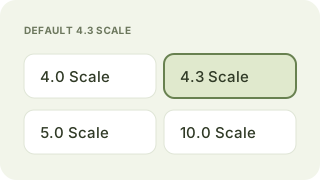
The 4.3 GPA scale is already set for you. It applies to every course and stays fixed in Simulator, so you can start entering grades and credits right away.
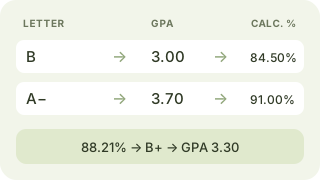
Enter credits and letter grades, then click Calculate Percentage. Each grade maps to a Calculation Percentage. Credits weight the total, which determines your overall letter grade and GPA.
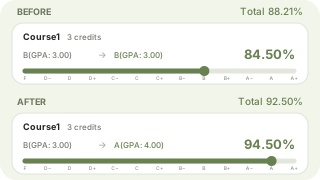
Drag the slider from F to A+. Original grades stay gray while simulated grades and percentages appear in green. Credits stay fixed as your total percentage and GPA update.
This calculator assigns each course a Calculation Percentage based on its letter grade, then combines these percentages using course credits. The total percentage determines your overall letter grade and the corresponding GPA on your selected scale. The examples below use the 4.3 GPA scale.
Match each course’s letter grade to the Calculation Percentage in the reference table. For example, B uses 84.50%, while A− uses 91.00%. These are fixed calculation values used by this tool, rather than the course’s original percentage grade.
Multiply each course’s Calculation Percentage by its credits. Courses with more credits contribute more to the total. A 3-credit B contributes 84.50 × 3 = 253.50. A 4-credit A− contributes 91.00 × 4 = 364.00.
Add the weighted course percentages, then divide by the total credits. For the two example courses: (253.50 + 364.00) ÷ (3 + 4) ≈ 88.21%. Keep full precision during the calculation and round only the displayed result to two decimal places.
Percentage is calculated based on the Calculation Percentage corresponding to the letter grade you entered.
| Letter Grade (Percentage) | Calculation Percentage | 4.3 GPA Scale |
|---|---|---|
| A+ (97–100%) | 98.50% | 4.30 |
| A (93–96%) | 94.50% | 4.00 |
| A− (90–92%) | 91.00% | 3.70 |
| B+ (87–89%) | 88.00% | 3.30 |
| B (83–86%) | 84.50% | 3.00 |
| B− (80–82%) | 81.00% | 2.70 |
| C+ (77–79%) | 78.00% | 2.30 |
| C (73–76%) | 74.50% | 2.00 |
| C− (70–72%) | 71.00% | 1.70 |
| D+ (67–69%) | 68.00% | 1.30 |
| D (63–66%) | 64.50% | 1.00 |
| D− (60–62%) | 61.00% | 0.70 |
| F (Below 60%) | 0.00% | 0.00 |
探索其他適合你學分計算需求的計算器。
Your GPA goals start with your next assignment
Upload your assignment requirements and references, and use Verla to build a draft aligned with your course criteria.
Start Your Assignment With Verla AIUse the draft as a starting point for your own work. Your final grades depend on the work you submit and your course’s assessment criteria.