GPTinf is easy to understand: paste in AI-written text, humanize it, then check how AI detectors read the result.
The buying decision is harder.
If you are considering GPTinf, three questions matter more than the feature list: How much does it really cost? Does the humanizer live up to its AI detection claims? And is it enough for the kind of writing you actually need to finish?
We reviewed GPTinf around those questions, with the hope of making that decision a little easier.
What Is GPTinf, and What Do You Actually Get?
GPTinf is primarily an AI Humanizer, but the product has grown into a broader writing toolkit.
The basic workflow is simple. Give it a draft, choose a rewriting mode, humanize the text, and check the result with its built-in AI Detector. There are also tools for paraphrasing, plagiarism, grammar, readability, and essay writing. Its AI Detector is currently free and unlimited, with sentence-level feedback and support for PDF and Word uploads.
For most people comparing AI humanizers, though, two features matter more than the rest.
The first is Freeze Keywords. You can lock names, citations, technical terms, or other wording that should survive a rewrite unchanged.
The second is control over the rewrite itself. GPTinf offers different modes for academic, formal, informal, simplified, expanded, shortened, and more creative writing. It also lets users re-humanize or selectively rewrite parts of the output on higher plans.
That is useful because aggressive humanization has an obvious downside: sometimes the sentence becomes “more human” but less accurate.
GPTinf at least gives you some control over that trade-off.
The limitation is equally simple. GPTinf still starts with text. It can change how a paragraph reads, but it does not automatically know the rubric behind that paragraph, the readings your professor assigned, or whether the argument still answers the original question.
For a short rewrite, that may not matter.
For a complete assignment, it starts to matter quite quickly.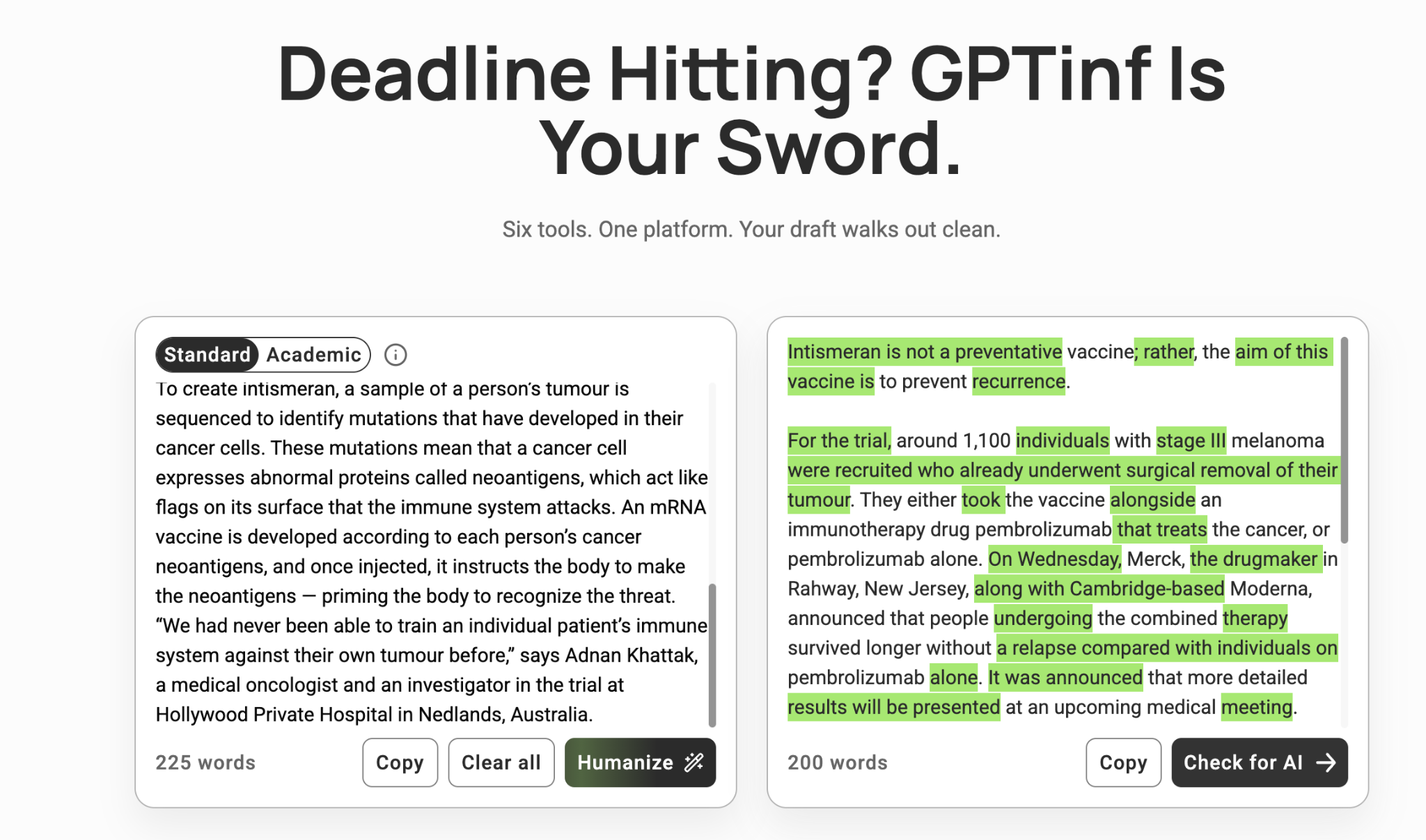
GPTinf Pricing: Is It Worth Paying For?
Here is where you need to slow down.
GPTinf can look like a $5/month AI Humanizer.
It is—if you are willing to pay for a year.
The normal month-to-month Lite plan is $9.99 and comes with 5,000 Humanizer words. Pro is $24.99 for 25,000 words, while Unlimited costs $59.99. Pay annually and those effective monthly prices fall to roughly $5, $12.50, and $30.
The discount is real. So is the commitment.
And for students, the more interesting number is not $9.99.
It is 5,000 words.
Take a fairly ordinary 1,500-word essay. One full humanization uses about 30% of the Lite allowance. Run the paper through again after making revisions and you have used around 60%.
Suddenly, “5,000 words per month” feels less like a large bucket and more like two or three serious passes.
Unused words also do not roll over. Whether you pay monthly or annually, the allowance resets each month.
Pro makes more sense if humanizing is something you do every week. The jump to 25,000 words gives you room to experiment, and it unlocks selective rephrasing and re-humanization without forcing you to keep rebuilding the whole passage.
The free plan should make the decision easier.
Oddly, GPTinf's own pages currently disagree on exactly how free it is.
The live Humanizer page says you can process 300 words per request without an account. GPTinf's Help Center still lists 120 words per run for anonymous users and 240 words total after registration.
I would not overthink the discrepancy. Open the tool and see what allowance it gives you today.
What I would think about is the refund window.
GPTinf reviews refund requests case by case within three days of the charge. Annual plans follow the same window, and refunds after those three days are generally not offered for the remaining term.
That makes the buying order fairly obvious:
Try it free. If you like the output, try a month. Pay annually once you already know you want to keep using it.
Not the other way around.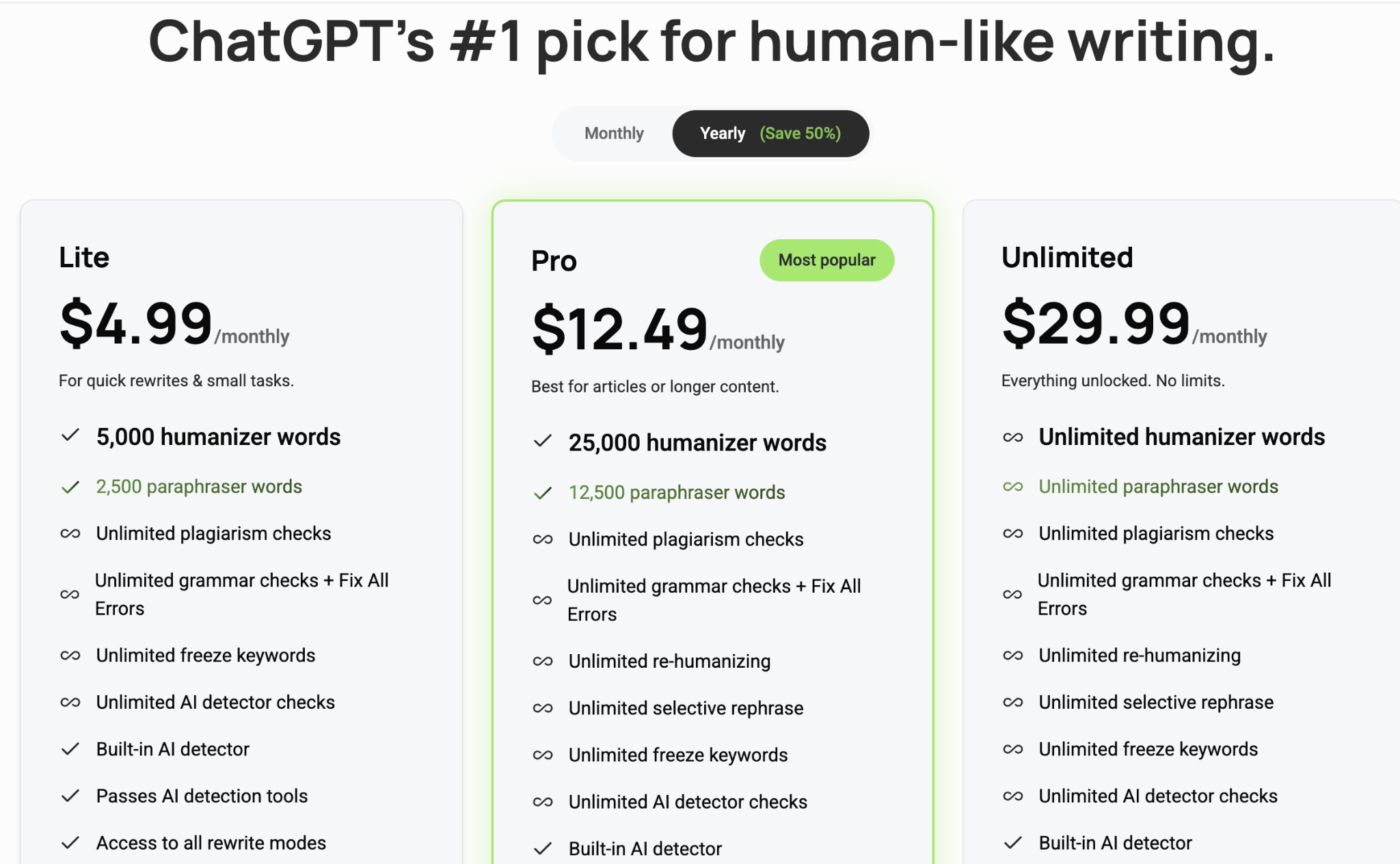
Does GPTinf Really Bypass AI Detection?
This is where GPTinf gets interesting.
Go to the pricing page and the answer sounds almost effortless.
GPTinf says its Ultra Humanizer delivers an “always 0% AI score.” The same page goes even further, saying its plans can bypass AI detectors “without exception.”
No asterisks. No “results may vary.”
Just zero.
That is a powerful promise when you are standing on the checkout page.
Then something changes once you start looking for help.
GPTinf's Humanizer FAQ says no AI Humanizer can honestly guarantee 100% success every time because detectors keep changing. Its Help Center explains that different detectors may give completely different scores for the same passage. And if your humanized text is still detected as AI, GPTinf suggests trying another mode, shortening the text, rewriting the difficult sections again, or selectively rephrasing whatever remains flagged.
All of that is reasonable advice.
It just sounds very different from “without exception.”
The product that looked certain on the pricing page suddenly becomes much more philosophical when the result does not cooperate.
Different detector.
Different threshold.
Technical writing is harder.
Try another mode.
Run it again.
The problem is not that these explanations are wrong. They are actually much closer to how AI detection works.
The problem is that you mostly hear them after the absolute promise.
And that makes the usual question—“Does GPTinf bypass AI detection?”—harder to answer than GPTinf's marketing makes it sound.
There is no universal AI detector waiting at the end of the internet to give your essay one final score. GPTZero, Turnitin, Copyleaks, Originality.ai, and other systems use different models and thresholds. GPTinf itself acknowledges that the same passage can receive very different results depending on which detector checks it.
So a 0% result inside one workflow cannot mean every other system will agree.
To GPTinf's credit, its support documentation eventually arrives at much better advice: do not endlessly rewrite a passage just to chase a lower number. Read the result. Check whether the meaning survived. Keep technical terms accurate. Make sure citations still support the sentence. Then treat AI detection as another signal—not the definition of whether the writing is good.
We agree with that advice.
We are just less sure how comfortably it sits beside “always 0% AI score.”
Because there is a fairly simple question worth asking whenever you buy software like this:
If a product sounds absolutely certain about what it can do while asking for your money, but becomes much less certain when you ask why it did not work, how much weight should you give the original promise?
We will leave that one with you.
Is GPTinf Worth It?
Yes, if what you want is a focused AI Humanizer.
GPTinf is easy to use, Lite is reasonably priced, Freeze Keywords is genuinely useful, and having humanization and AI detection in one place removes some annoying tab switching.
I would be more cautious if the reason you are paying is the promise of a guaranteed 0% AI result. GPTinf's own support material gives a much more nuanced picture than that marketing claim.
For students, there is one more question:
Do you need a Humanizer, or do you need to finish an assignment?
If the paper is already good and you just want to work on how several paragraphs sound, GPTinf may be enough.
If you are still checking the rubric, sources, citations, structure, AI signals, and final draft, humanization is only one step in a much longer job.
The Best GPTinf Alternative for Students
Imagine your essay is almost finished.
The prompt is in one tab. Three source PDFs are open somewhere else. You have a draft, but two sections still sound mechanical. You run them through a Humanizer, check the AI score, then go back to the original sources because one sentence now feels slightly wrong.
This is where the difference between GPTinf and Verla becomes clearer.
GPTinf is built around the text you want to rewrite.
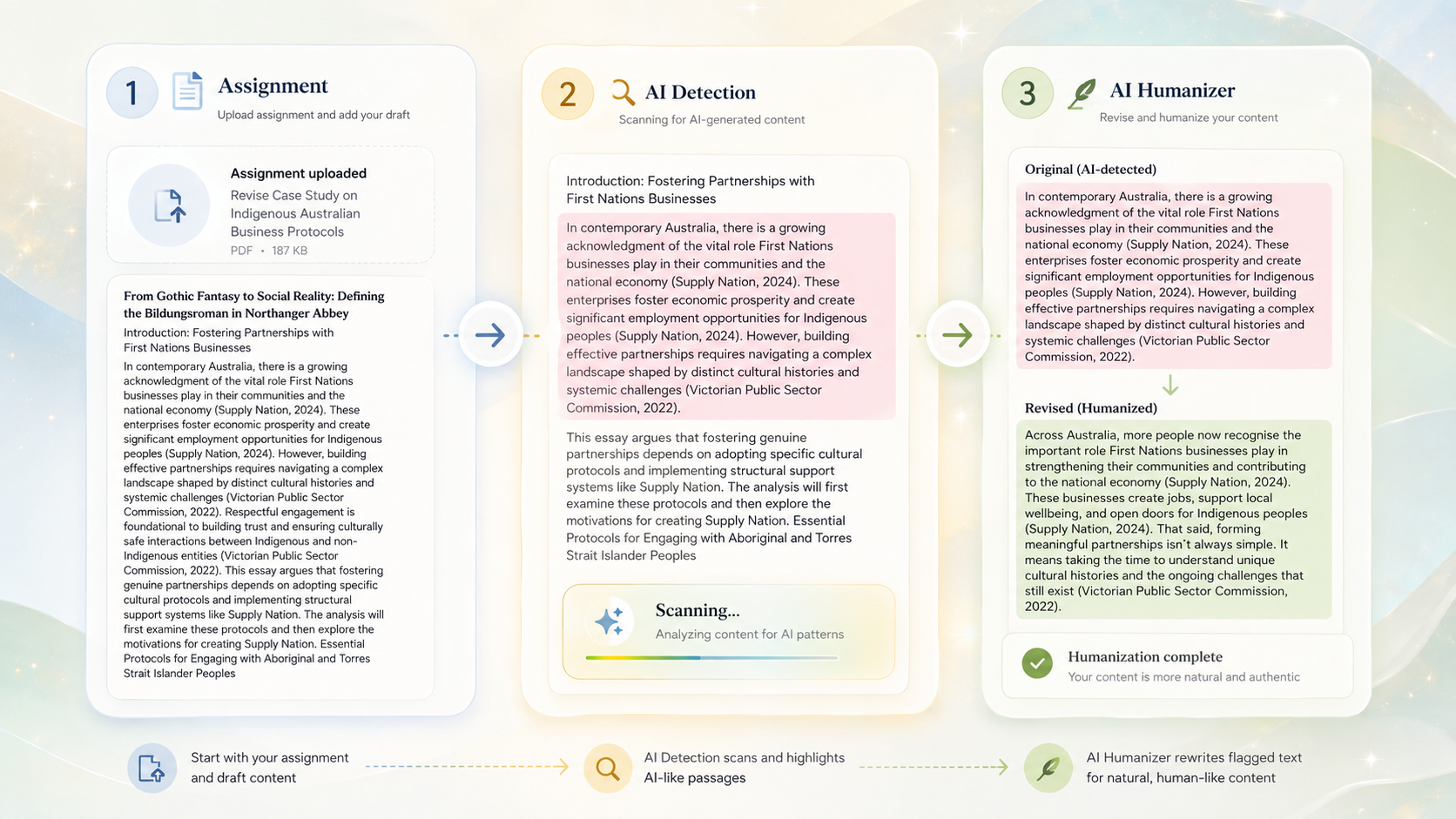
Verla Assignment can start earlier, with the prompt, notes, source materials, datasets, and reference files that produced the draft in the first place. That context stays available while you work on structure, evidence, revision, and academic tone.
Once you have a draft, Verla AI Detection checks it paragraph by paragraph. Instead of seeing one number and wondering what to rewrite, you can focus on the sections that actually deserve another look.
Then Verla AI Humanizer handles those passages while keeping the original and rewritten versions easy to compare.
The price difference is also fairly easy to understand.
GPTinf Lite works out to about $5 per month when paid annually and gives you 5,000 Humanizer words.
Verla Basic is $7.99 per month when billed annually. It includes the same 5,000 Humanizer words, plus 10,000 AI Detection words, three Assignment uses per month, and up to five uploaded files per assignment.
So I would not call GPTinf overpriced.
If all you want is humanization, GPTinf is actually the cheaper option.
The reason to choose Verla is different.
For a student, the thing you ultimately need to finish is not a humanized paragraph.
It is the assignment.