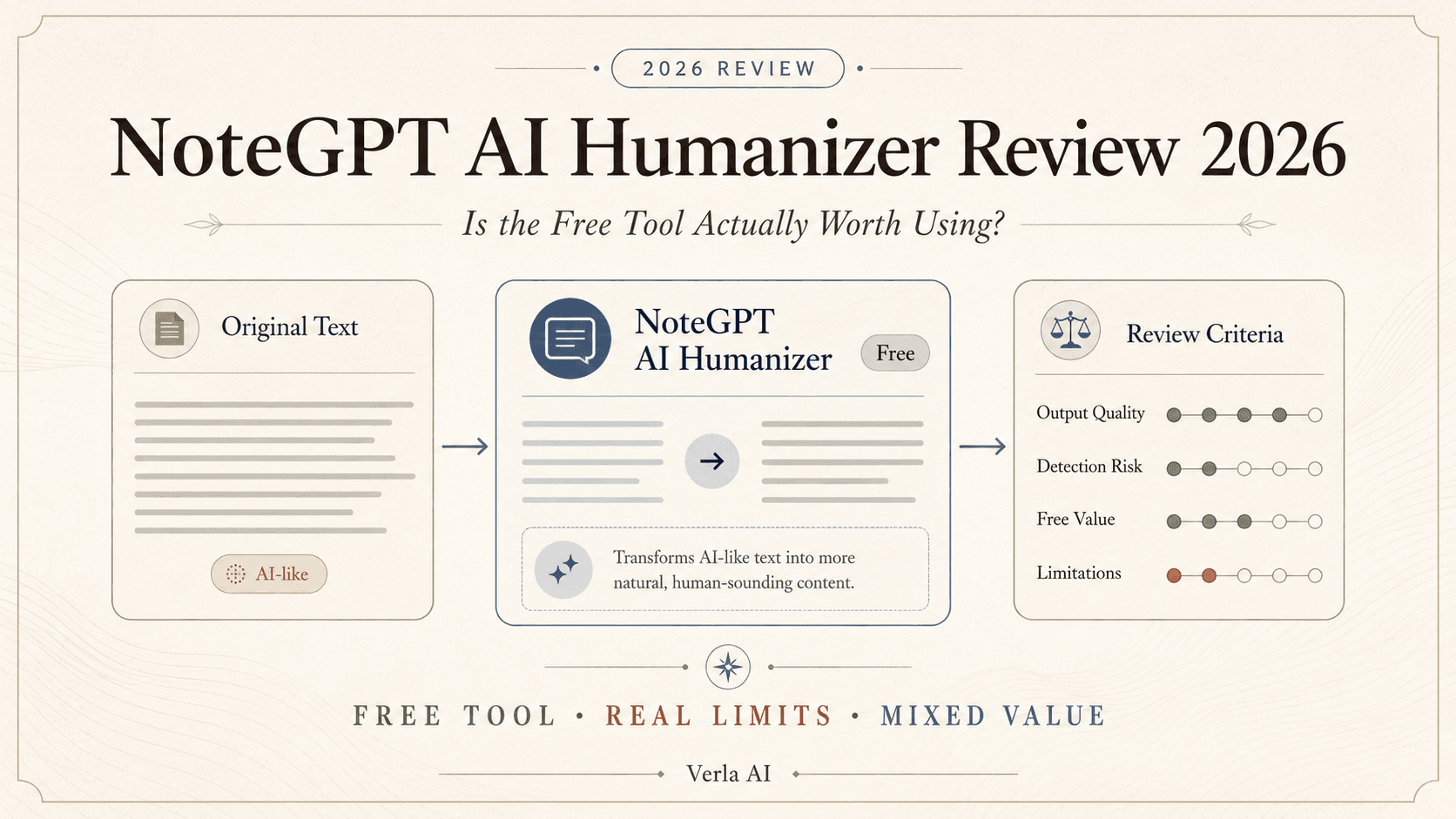
NoteGPT makes its AI Humanizer difficult to ignore.
It is free. It requires no sign-up. And the page puts “100% Human Text” right in the title.
Sounds like an easy decision.
It isn't.
The real questions are whether that “100% human” promise means anything, whether you need to pay for NoteGPT at all, and whether a free Humanizer is enough when the thing you actually need to finish is an assignment.
That is what this review focuses on.
What Is NoteGPT AI Humanizer, and What Do You Actually Get?
The first thing to understand about NoteGPT is that the AI Humanizer is not really the product.
It is one tool inside a much larger product.
NoteGPT describes itself as an all-in-one AI learning assistant. The platform handles YouTube videos, PDFs, transcription, summaries, mind maps, AI chat, homework, presentations, flashcards, quizzes, translation, and a growing collection of AI creation tools. The Humanizer sits somewhere inside that ecosystem alongside an AI Detector and Essay Writer.
That explains a lot about the Humanizer itself.
There is almost no friction.
Paste in some text. Choose a tone. Humanize it.
NoteGPT currently offers nine preset tones plus custom tone control, supports multiple languages, and accepts up to 10,000 characters in a single run. It is designed to make a draft read more naturally without turning humanization into a complicated editing workflow.
For short content, that is a feature.
Sometimes you do not need a dashboard full of sliders telling you how “academic,” “readable,” or “undetectable” your paragraph should become.
You just want the paragraph to stop sounding like ChatGPT wrote it five seconds ago.
NoteGPT is good at making that first step feel easy.
There is also an important difference between NoteGPT and many dedicated AI Humanizers.
You are not really being pushed toward a more expensive Humanizer tier every time you use it. NoteGPT's current quota policy lists AI Detector & Humanizer as free features.
That changes how this product should be judged.
A paid Humanizer needs to justify the subscription.
A free one mostly needs to justify your time.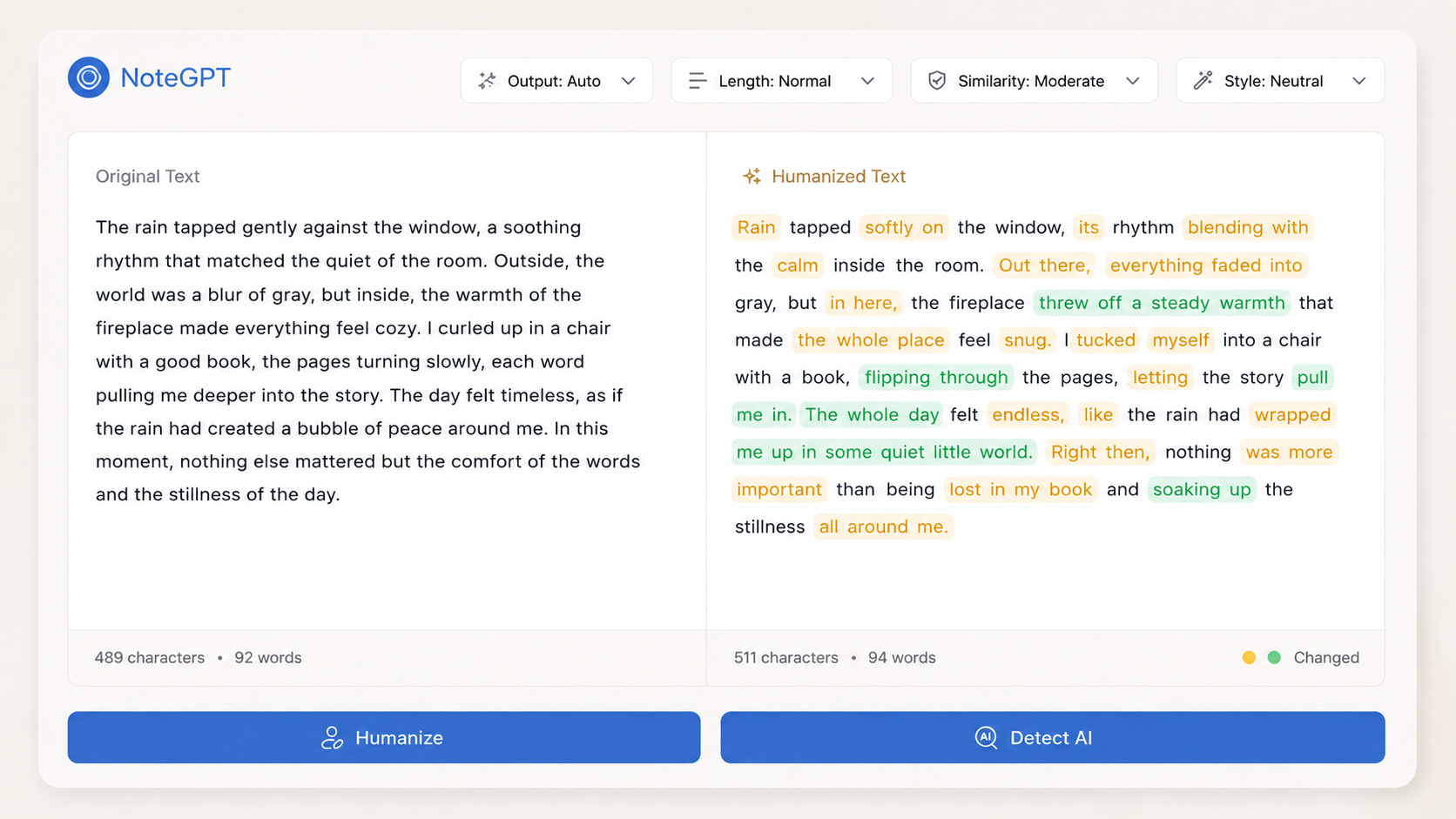
NoteGPT Pricing: Do You Actually Need to Pay for the Humanizer?
Here is the unusual part.
If you found NoteGPT because you searched for an AI Humanizer, the pricing page is almost a distraction.
NoteGPT currently sells Pro for $9.99 month to month, or $108 for a year, which works out to $9 per month. Unlimited costs $29 monthly or $239 yearly. Max jumps all the way to $99 monthly or $829 yearly.
Those prices sound like they should matter to this review.
For the Humanizer itself, they mostly don't.
Buried in NoteGPT's own quota policy is the useful sentence: AI Detector & Humanizer — Free. They do not consume the same quotas used by features such as summaries, transcription, AI chat, or PDF processing.
So if the Humanizer is the only reason you are here, there is no clever pricing calculation to make.
Use it for free.
Do not buy Pro because you want a better NoteGPT Humanizer.
Buy Pro because you also want NoteGPT.
That means more summarization, transcription, AI chat, mind maps, premium models, audio tools, images, slides, and the rest of the ecosystem. Pro includes 1,000 basic quotas and 100 premium credits per month; the larger plans raise those limits substantially.
This sounds obvious once you say it.
It is less obvious when you land on a Humanizer review, see a pricing page, and start comparing $9 against every other AI Humanizer subscription on the internet.
NoteGPT is not really selling the Humanizer for $9.
It is selling you a large AI toolbox for $9 and leaving the Humanizer sitting near the front door for free.
That makes NoteGPT quite good value if you actually want the toolbox.
If you don't, paying does not suddenly make the free tool a smarter purchase.
There is one subscription detail I would check carefully before choosing an annual plan.
Actually, NoteGPT should probably check it too.
Its current Subscription Policy says annual subscriptions automatically renew for another year and tells users to cancel before the renewal date. The Pricing page says the same thing.
But its Quota & Credit Policy, updated one week later, says annual subscriptions do not auto-renew.
Both cannot be true.
There is also an official NoteGPT help page that says annual plans do not renew automatically.
This is not a minor wording difference if you are about to pay for twelve months.
Until NoteGPT cleans that up, I would check the actual subscription status inside the account after purchase rather than assuming any one of those pages has the final answer.
The refund policy gives you another reason not to rush.
NoteGPT currently allows refund requests only within 24 hours of the first purchase, deducts the value of premium credits already used, and says discounted purchases are non-refundable.
Which brings us back to the easiest purchasing advice in this entire review:
If you came for the Humanizer, there is almost nothing to purchase yet.
Try it.
See whether you like the writing.
Then decide whether the rest of NoteGPT is worth paying for.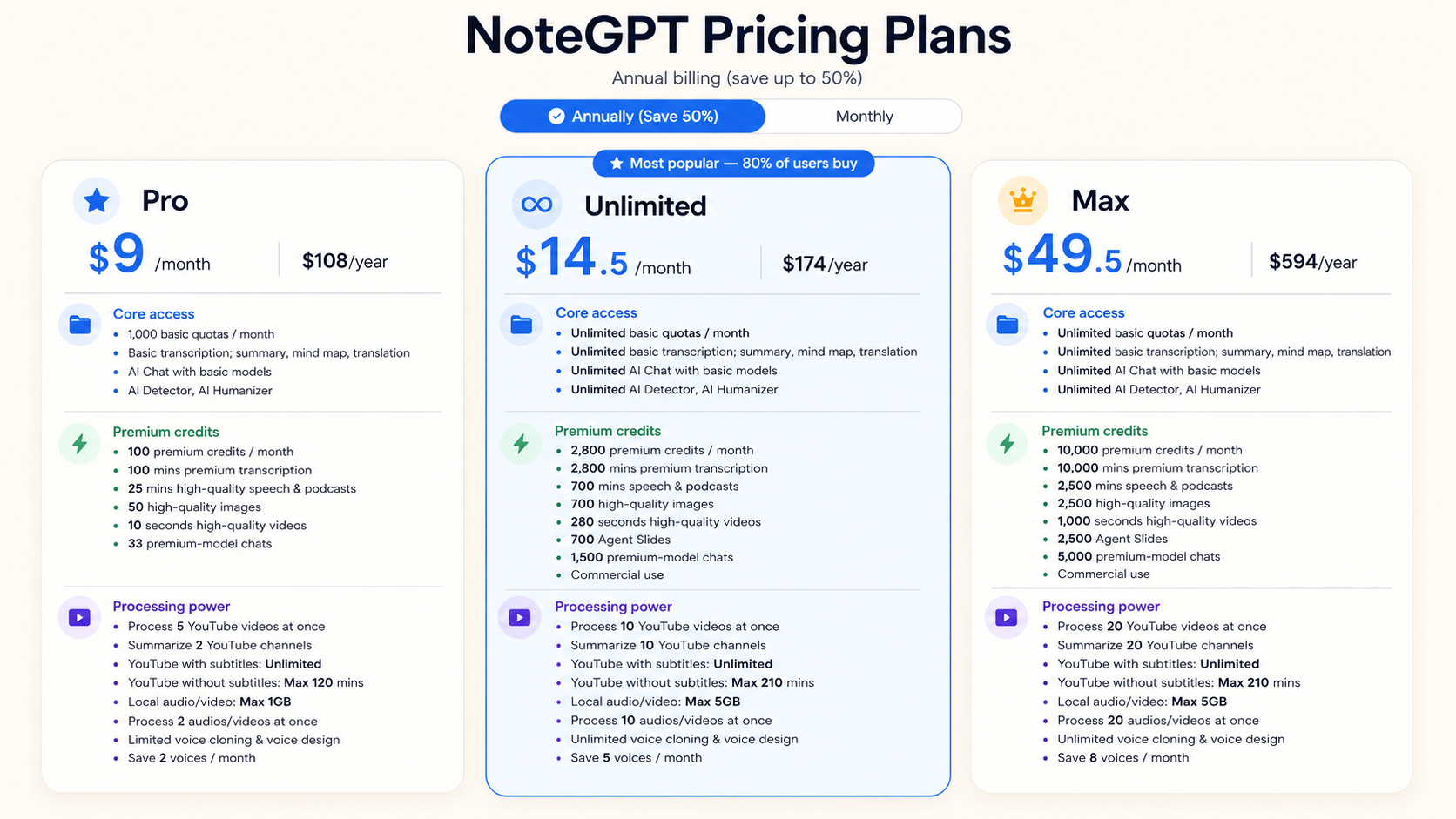
Does NoteGPT Really Make AI Text “100% Human”?
This is the more interesting question.
NoteGPT's page does not whisper its promise.
The title says:
“100% Human Text.”
That sounds measurable.
Put AI text in.
Get human text out.
Done.
But scroll down the same page and the language starts becoming noticeably softer.
The Humanizer is described as making text more human-like, more natural, clearer, easier to read, and less robotic. The final result is repeatedly described in terms of tone and readability rather than some universal AI detection result.
Then you reach the FAQ.
There, NoteGPT acknowledges that AI detection is not foolproof.
And this is where one small phrase starts doing a lot of work.
“Human-like.”
That is not the same thing as “100% human.”
“Human-like” is a reasonable goal for a writing tool.
The paragraph sounded stiff before. Now it flows better.
The sentence was generic. Now it feels more specific.
The wording was painfully polished. Now it sounds like somebody might actually say it.
Great.
But “100% human” sounds like a result.
It implies that there is some clear line the text has crossed. AI on one side. Human on the other.
Writing does not work like that.
Neither does AI detection.
Even NoteGPT separates the two jobs. It has an AI Humanizer for rewriting and a separate AI Detector for estimating whether content shows patterns associated with AI generation. Its Detector returns a percentage rather than some universal certificate that the text has officially become human.
So the better way to test NoteGPT is not to stare at the headline and ask whether the software has somehow converted the authorship of a paragraph.
Look at what changed.
Did it remove the repetitive sentence openings?
Did it break up that suspiciously perfect rhythm?
Did it make a vague transition more specific?
Did it preserve the point?
Or did it just shuffle the words around until the paragraph looked different enough to feel new?
That last question matters especially for academic writing.
A sentence can sound more natural and become less accurate at the same time.
A technical term can be replaced with a friendlier word that means something slightly different.
A careful claim can suddenly become stronger than the source supports.
A citation can remain in exactly the same place while the sentence in front of it no longer says quite the same thing.
A Humanizer cannot know that simply because the rewritten paragraph sounds better.
NoteGPT itself says the tool is intended to maintain meaning, tone, and clarity while making drafts more natural. That is a useful standard to hold it to.
So I would ignore “100% human” for a moment.
Read the output as writing.
If it sounds better and still says exactly what you meant, the tool helped.
If it gives you a prettier paragraph that now needs ten minutes of repair, the fact that it was free becomes less exciting.
And if your only definition of success is whether another AI detector displays a lower percentage, you have handed the final judgment to a completely different piece of software anyway.
The biggest problem with “100% Human Text” is therefore not that NoteGPT cannot make writing more natural.
It probably can.
The problem is that the useful promise is sitting further down the page:
Make AI writing sound more human.
That is a writing task.
“100% human” is marketing.
Is NoteGPT AI Humanizer Worth Using?
Yes.
That is an unusually easy conclusion.
It is free, requires no sign-up, handles fairly long inputs, offers tone controls, and does not ask you to commit to a subscription just to find out whether you like the output.
So try it.
The part I would not do is build a purchase decision around the Humanizer itself.
If you already use NoteGPT for YouTube summaries, PDFs, transcripts, notes, or AI chat, the Humanizer is a nice extra.
If humanization is the main thing you need, the question becomes different.
A free rewriting box can improve a paragraph.
It still leaves you responsible for everything around that paragraph.
And for a student, that is usually where most of the work lives.
The Best NoteGPT Alternative for Students
This is where NoteGPT deserves some credit.
It does a lot.
Maybe too much to compare with Verla as if the two products were trying to win the same race.
If your week consists of watching lectures, summarizing YouTube videos, transcribing recordings, turning notes into mind maps, generating flashcards, and chatting with different AI models, NoteGPT is the broader product. That is exactly how it positions itself.
If your problem is an assignment due tomorrow, breadth matters less.
You have the rubric.
Three PDFs.
A draft that is not quite working.
One paragraph sounds AI-generated. Another has a citation you no longer trust. The conclusion technically answers the question, but not very well.
You do not need another image generator.
You need to finish the paper.
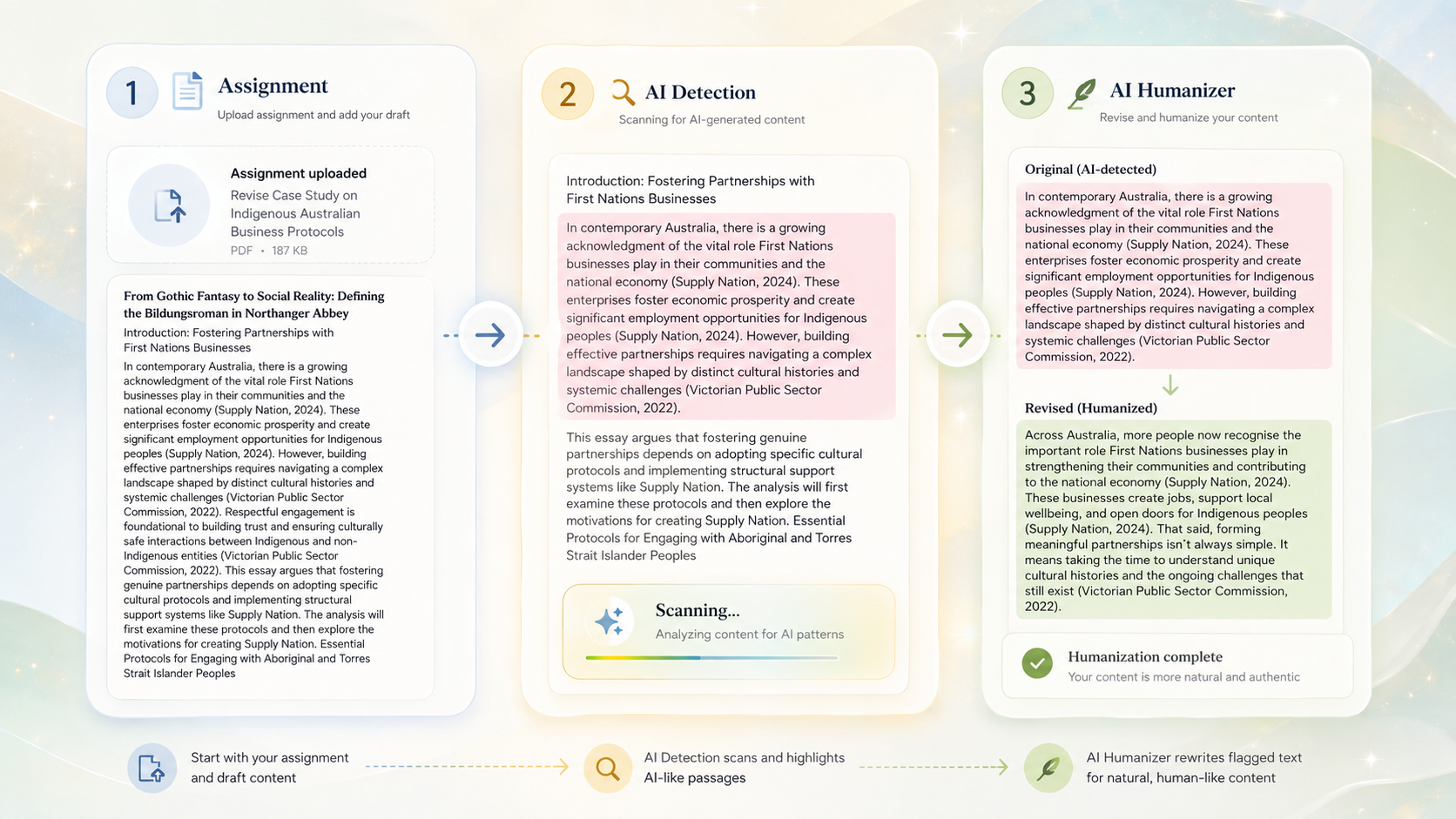
Verla Assignment starts with that context. You can bring in the prompt, rubric, notes, source materials, datasets, and reference files instead of waiting until the draft already exists and then treating it as an isolated block of text.
Once the draft is there, Verla AI Detection checks it paragraph by paragraph so you can see which sections deserve attention rather than reacting to one document-wide number.
Then Verla AI Humanizer lets you rewrite those sections and compare the new version against the original instead of blindly replacing the entire draft.
That is the difference.
NoteGPT gives you a Humanizer inside a very large learning toolbox.
Verla puts humanization inside the workflow of finishing academic work.
There is an obvious trade-off.
NoteGPT's Humanizer is free. Verla's isn't.
Verla Basic currently starts at $7.99 per month with annual billing and includes 5,000 Humanizer words, 10,000 AI Detection words, three Assignment uses, and file uploads for each assignment.
If all you have is one awkward paragraph, paying $7.99 would be silly.
Use NoteGPT.
If you are already paying for different tools to generate the assignment, check AI patterns, humanize sections, work with sources, and keep the final draft aligned with the original requirements, the calculation changes.
The cheapest individual tool is not always the cheapest way to finish the job.
NoteGPT is a good free AI Humanizer.
Verla makes more sense when the assignment—not the Humanizer—is the thing you actually need to complete.